Background Removal vs. Clipping Path: Which One Should You Choose?
In e-commerce, advertising, and print media, crisp, distraction-free product images directly drive engagement and sales. However, isolating a subject from its background can be achieved through different image-editing techniques—most notably Clipping Path and Background Removal (or Masking/Selection-based removal).
While people often use these terms interchangeably, they rely on fundamentally different tools, workflows, and edge precision. Understanding the difference is critical to choosing the right approach for your project, budget, and image type.
What is a Clipping Path?
A Clipping Path is a vector-based technique used to outline an object using Photoshop’s Pen Tool. The editor manually creates anchor points around the edges of the subject, forming a closed vector path. Everything inside the path remains visible, while everything outside is hidden or removed.
Key Characteristics:
-
Vector Precision: Produces clean, sharp, hard edges that can be scaled without quality loss.
-
Best for Hard-Edged Objects: Ideal for products with defined outlines like shoes, furniture, electronics, boxes, jewelry, and watches.
-
Reusability: The vector path can be saved directly within formats like TIFF, PSD, or EPS, allowing future editors to tweak or reuse the outline anytime.
What is Background Removal?
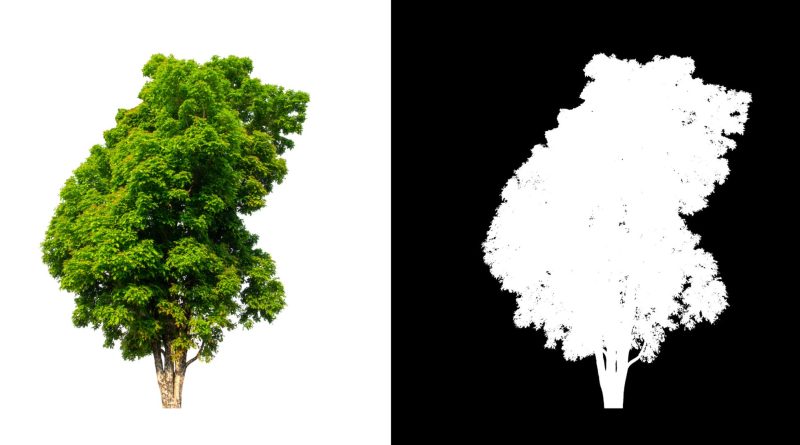
Background Removal is a broader term covering raster-based extraction methods. It encompasses techniques like Image Masking (Alpha Channel, Layer Mask, Hair Masking), Magic Wand selections, Color Range selections, and AI-driven background removal algorithms.
Key Characteristics:
-
Pixel-Level Softness: Deals with intricate, fine details where hard lines don’t exist.
-
Best for Complex Edges: Essential for subjects with hair, fur, transparent glass, mesh fabrics, smoke, or tree leaves.
-
Blend & Transparency: Captures semi-transparency and soft transitions that vector paths cannot achieve.
Head-to-Head Comparison
| Feature | Clipping Path | Background Removal / Masking |
| Primary Tool | Pen Tool (Vector Anchor Points) | Layer Masks, Channel Masking, AI Selection Tools |
| Edge Quality | Sharp, crisp, vector-defined edges | Soft, natural, feather-blended edges |
| Best For | Solid objects, smooth curves, hard corners | Fine hair, fur, transparent glass, netted fabrics |
| Scalability | Non-destructive vector path stays intact | Raster selection dependent on pixel resolution |
| Processing Time | Requires precision manual labor per node | Varies from instant (AI) to highly detailed manual brushwork |
| File Formats | PSD, EPS, TIFF (stores paths) | PNG, WebP, PSD (supports transparency layers) |
Which One Should You Choose?
Choose Clipping Path If:
-
You edit standard e-commerce products: Bags, shoes, kitchenware, mobile phones, or packaged goods.
-
You need multi-path capability: You want to isolate distinct parts of a product (e.g., separating shoe laces from the sole) for color-correction or re-texturing.
-
You are preparing graphics for high-res print media: Catalogs, billboards, and magazines require exact vector borders.
Choose Background Removal / Masking If:
-
Your subject has fine hair or fur: Fashion models, portraits, pets, or plush toys.
-
You are handling transparent or translucent items: Glass bottles, liquids, sunglasses, or lace garments.
-
You require natural shadows and reflections: Retaining subtle shadow gradients against translucent backgrounds.
Final Recommendation
For most professional workflows, a combination of both techniques yields the best result. A photo editor might use a clipping path for the solid frame of an item (like a model’s jacket) and switch to advanced image masking for the hair or soft fabrics.
For professional image processing, clipping path services, and background removal tailored to e-commerce and commercial graphics, explore ColourCubz.