From Basic to Pro: 10 Image Clipping Hacks You Need Today
In today’s digital-first world, visuals are everything. Whether you’re managing an eCommerce store, running social media campaigns, or working as a designer, high-quality images play a critical role in attracting attention and driving engagement. One of the most essential editing techniques behind these polished visuals is image clipping.
Image clipping helps isolate subjects, remove backgrounds, and create clean, professional-looking images that stand out. But mastering it requires more than just basic tools—it demands the right techniques, workflow, and attention to detail.
In this in-depth guide, you’ll discover 10 powerful image clipping hacks, ranging from beginner-friendly tips to advanced professional strategies, helping you elevate your image editing skills to the next level.
What is Image Clipping?
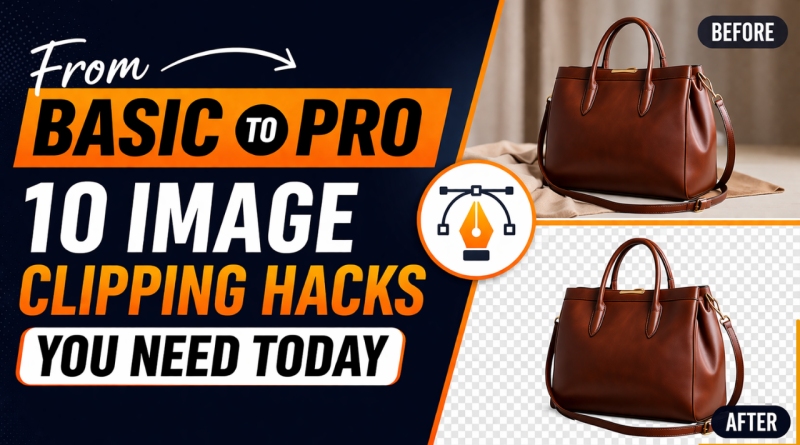
Image clipping is the process of removing or isolating parts of an image—usually the background—so the main subject can be reused in different contexts. This is commonly done using clipping paths, masking techniques, or AI-powered tools.
It is widely used in:
- eCommerce product photography
- Advertising and marketing
- Graphic design projects
- Social media content creation
Clean and precise clipping ensures your images look professional, consistent, and visually appealing.
-
Choose the Right Tool for the Job
The first step in mastering image clipping is selecting the appropriate tool. Beginners often rely on automatic tools, while professionals use more precise manual techniques.
Automatic tools are great for speed, but they can struggle with complex edges. On the other hand, manual tools like the pen tool offer unmatched accuracy.
Pro Tip:
Start with AI-based selection for speed, then refine manually for perfection.
-
Master the Pen Tool for Precision
The pen tool is considered the most reliable method for creating accurate clipping paths. It allows you to draw smooth, controlled outlines around objects.
Why professionals prefer it:
- Delivers sharp and clean edges
- Handles complex shapes effectively
- Offers full control over curves and angles
Although it has a learning curve, mastering the pen tool is essential for high-quality results.
-
Work at High Zoom Levels
One of the simplest yet most effective hacks is working while zoomed in. Many beginners make the mistake of clipping at low zoom levels, which leads to rough edges.
Best Practice:
Zoom in between 200% and 300% to capture fine details and ensure precision.
This is especially important for product images and detailed objects.
-
Use Feathering for Natural Edges
Hard edges can make your images look artificial. Feathering softens the transition between the subject and the background.
When to use feathering:
- Portrait images
- Soft materials like fabric
- Natural objects like flowers
Even a slight feather (0.5–1 px) can significantly improve realism.
-
Use Layer Masks for Non-Destructive Editing
Instead of permanently removing parts of an image, use layer masks. This technique allows you to hide or reveal parts of an image without deleting them.
Benefits include:
- Easy corrections
- Flexibility during editing
- Better workflow management
Layer masking is a must-have skill for anyone working professionally.
-
Handle Hair and Fine Details Carefully
Hair, fur, and intricate edges are some of the most challenging aspects of image clipping. Basic tools often fail to capture these details accurately.
Advanced Hack:
Use edge refinement tools combined with manual touch-ups. Adjust contrast and use soft brushes to refine tricky areas.
This hybrid approach ensures natural-looking results.
-
Increase Contrast for Better Selection
Sometimes, selecting an object becomes difficult because it blends with the background. Increasing contrast temporarily can help define edges more clearly.
Quick Trick:
Adjust brightness and contrast levels before making selections, then revert changes after clipping.
This makes the process faster and more accurate.
-
Use Clipping Paths for eCommerce Consistency
In eCommerce, consistency is key. Clean white backgrounds and uniform product images improve trust and conversions.
Clipping paths are ideal for:
- Product catalogs
- Online marketplaces
- Advertising banners
They ensure your images look professional and consistent across platforms.
-
Batch Process for Faster Workflow
If you’re working with multiple images, editing them one by one can be time-consuming. Batch processing helps apply similar edits across multiple files.
Use Cases:
- Large product inventories
- Bulk image editing
- Catalog preparation
This significantly boosts productivity without compromising quality.
-
Combine AI Tools with Manual Refinement
AI-powered tools have revolutionized image editing, making clipping faster than ever. However, they are not perfect.
The best workflow is:
- Use AI for initial selection
- Refine edges manually
- Finalize with masking and adjustments
This combination ensures both speed and precision.
Why Image Clipping is Crucial for Your Business
High-quality images directly influence how customers perceive your brand. Poorly edited visuals can reduce trust and lower conversion rates.
On the other hand, professionally clipped images:
- Enhance product appeal
- Improve brand credibility
- Increase engagement and sales
In competitive markets, even small visual improvements can make a big difference.
Common Mistakes to Avoid
While learning image clipping, avoid these common errors:
- Ignoring edge details
- Overusing feathering
- Relying only on automatic tools
- Not checking images on different backgrounds
Fixing these mistakes can instantly improve your results.
When Should You Outsource Image Clipping?
While learning these techniques is valuable, handling large volumes of images can be overwhelming and time-consuming.
If you:
- Run an eCommerce business
- Manage bulk product images
- Need consistent, high-quality results
…it’s often more efficient to outsource to professionals.
Professional Image Clipping Services You Can Trust
If you’re looking for accurate, high-quality image clipping without the hassle, professional services can save you time and ensure perfect results.
ColourCubz offers expert image clipping services tailored for businesses and individuals. Their team specializes in delivering clean, precise cutouts that meet industry standards.
With ColourCubz, you get:
- Hand-drawn clipping paths for maximum accuracy
- Fast turnaround times
- Affordable pricing for bulk projects
- Reliable quality for eCommerce, marketing, and design
👉 Learn more about their services here:
https://www.colourcubz.com/image-clipping-services
Final Thoughts
Image clipping is more than just removing backgrounds—it’s about creating visually compelling images that elevate your brand and content.
By applying these 10 image clipping hacks, you can move from basic editing to professional-level results. Whether you choose to do it yourself or outsource, mastering this skill will give you a strong advantage in today’s visual landscape.
Start implementing these strategies today and transform your images into powerful visual assets that truly stand out.